Tracing Pictures: The Artist’s Secret to Accurate Proportions
See Da Vinci Eye in action in the video below.
If you’ve ever felt frustrated trying to get proportions just right, you’re not alone. The distance between the eyes, the angle of a nose, the curve of a shoulder, these small details can make or break a drawing. Tracing pictures has been a go-to technique for professional artists for centuries, and it’s still one of the most effective ways to train your eye and nail those proportions every single time.
Here’s the thing: tracing isn’t about avoiding the hard work. It’s about working smarter so you can focus your energy where it really counts, like perfecting your shading, building up texture, and bringing your own style to the piece.
Why Professional Artists Use Tracing for Proportions
Walk into any professional studio and you’ll find illustrators, concept artists, and commercial designers using reference tools regularly. They’re not doing it because they can’t draw. They’re doing it because accurate proportions are the foundation that everything else is built on.

When you’re working on commission pieces or client projects, there’s no time to redraw a face five times because the eyes are slightly off. Tracing pictures lets you establish those foundational shapes quickly and correctly, so you can spend your time on the elements that actually make your art stand out.
Think of it this way: a carpenter uses a level to make sure their frame is straight. That doesn’t make them less skilled. It makes them smart about where to invest their expertise.
How AR Tracing Changes the Game
Traditional tracing methods like light boxes or grid systems work, but they come with limitations. Your paper has to be flat, your reference has to be the exact size you need, and if anything shifts, you’re starting over.

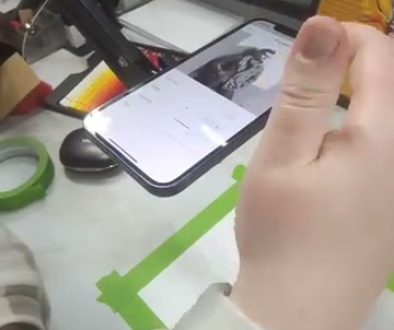
Da Vinci Eye uses augmented reality to overlay your reference photo directly onto your drawing surface through your phone screen. You see both your paper and the image at the same time, perfectly aligned, no matter what angle you’re working at.
The AR mode uses an anchor point to keep everything lined up even if you bump your phone or move your paper slightly. This might sound like a small thing, but when you’re three hours into a detailed portrait, not having to realign everything saves real frustration.
You can also adjust the size and position of your reference on the fly. Tap and drag to reposition, pinch to zoom in or out, or rotate with a two-finger twist if you want to fit your composition better. It takes seconds instead of requiring a whole new printout.
Setting Up Your Workspace for Tracing Pictures
Getting started is simpler than you might think. You’ll need your phone or tablet, your drawing surface, and a way to position your device so you can see the screen while you draw.

Some artists use a tall glass or can to prop up their phone. If you go this route, wrap a loop of painter’s tape around the top and bottom so your phone doesn’t slide when you touch the screen.
Position your phone at whatever angle works best for your dominant hand. Lefties and righties can both find a comfortable setup. The key is making sure you can see the screen clearly without straining your neck or blocking your light source.
If you want a more stable solution, there are phone stands designed specifically for this kind of work. They give you more flexibility with angles and keep everything secure even during longer drawing sessions.
Using the Overlay to Build Accurate Proportions
Once your reference is positioned, you’ll see it overlaid on your paper through your phone screen. Start by lightly sketching the basic shapes and proportions. You’re not trying to trace every detail at this stage.

Focus on placement first. Where does the top of the head sit? How far down is the nose? What’s the angle of the shoulders? These proportional relationships are what you’re really learning when you’re tracing pictures.
As you work, you can zoom in on your phone to see fine details or zoom out to check how the whole composition is coming together. Use the opacity slider to make the reference more or less transparent depending on what you need to see.
The breakdown mode is especially useful if you’re working with graphite or watercolor. It creates step-by-step stencils based on color values, so you can build up your drawing layer by layer instead of trying to tackle everything at once.
Where Your Artistic Skills Actually Matter
Here’s what tracing pictures doesn’t do: it doesn’t blend your pencil strokes, it doesn’t mix your colors, and it doesn’t understand light and shadow. Those skills are still 100% on you.
Once you’ve established your proportions, that’s when the real artistry begins. You’re making decisions about value, choosing which details to emphasize, deciding how to handle edges and transitions.
If you’re working with colored pencils like in the video, you’re picking which colors to layer, how much pressure to apply, and how to build up saturation gradually. If you’re painting, you’re mixing colors, controlling your water-to-paint ratio, and deciding on your brushwork.
These are the skills that make a drawing look alive. Tracing gives you the structure, but your understanding of materials and technique is what brings the piece home.
Building Your Style Through Structured Practice
One of the biggest misconceptions is that using reference tools somehow limits your creativity. The opposite is actually true.
When you’re not spending all your mental energy worrying about whether the eyes are too far apart, you have more freedom to experiment. Try a different medium. Push your values darker. Simplify some areas and add detail to others.
You can trace the basic outline and then completely change the style of how you render it. Maybe you want to work in a more graphic style with bold lines and flat colors. Maybe you want to go hyperrealistic with every hair defined. The proportional framework supports whatever direction you want to take.
As you practice, something interesting happens. Your hand starts to remember these proportional relationships. You begin to see the underlying structure in subjects even without the overlay. That’s your skills developing, not replacing your abilities but building them up.
Common Mistakes When Tracing Pictures
The biggest mistake is tracing too heavily right away. If you press hard with your pencil from the start, you’ll have dark lines that are difficult to erase or adjust later.
Start with light marks. You’re creating a map, not the final drawing. Once your proportions are in place, you can go back and refine, darken, and adjust as needed.
Another common issue is forgetting to check your work from a distance. Just because the overlay says something is in the right place doesn’t mean it will read correctly in your final piece. Step back regularly and look at the drawing as a whole.
Don’t skip the fundamentals of your medium. If you’re working with graphite, you still need to understand how to create smooth gradients and control your values. If you’re painting, you still need to know color theory and how your paints behave.
The strobe tool in Da Vinci Eye can help here. Tap it to quickly flip between your drawing and your reference so you can spot the small differences. Use this to check your values, not just your outlines.
Taking Your Practice Further
Once you’re comfortable with basic tracing, try challenging yourself. Trace the proportions, but then finish the drawing without looking at the reference. See how much you can do from the structure you’ve built.
Or trace one part of your subject accurately, like the face, and then draw the rest freehand. This helps you build confidence in different areas while still having that solid foundation where you need it most.
Pay attention to what you learn each time. Maybe you notice that you always make ears too small, or that you consistently misjudge the width of shoulders. These insights help you improve even when you’re drawing without any tools.
If you’re sharing your work online, the record feature captures a time-lapse of your entire process. You don’t need separate recording equipment. Just turn it on and draw, and you’ll have content ready to post when you’re done.
The goal isn’t to trace forever. The goal is to train your eye to see proportions accurately, to build your confidence, and to free up your creative energy for the parts of drawing that you’re most excited about. Tracing pictures is a tool, and like any tool, it’s most powerful when you understand exactly what it’s helping you accomplish.
Start drawing with Da Vinci Eye